 Best AI for Advisors
How to Get AI Meeting Notes Into Your CRM: A Handoff Checklist for Small RIAs (2026)
By William Foster, FounderPublished 7 min read
Disclosure: Some links on this page may be affiliate links, which means we may earn a commission at no extra cost to you. Listings are independent and sponsored placements are always labeled. Learn more.
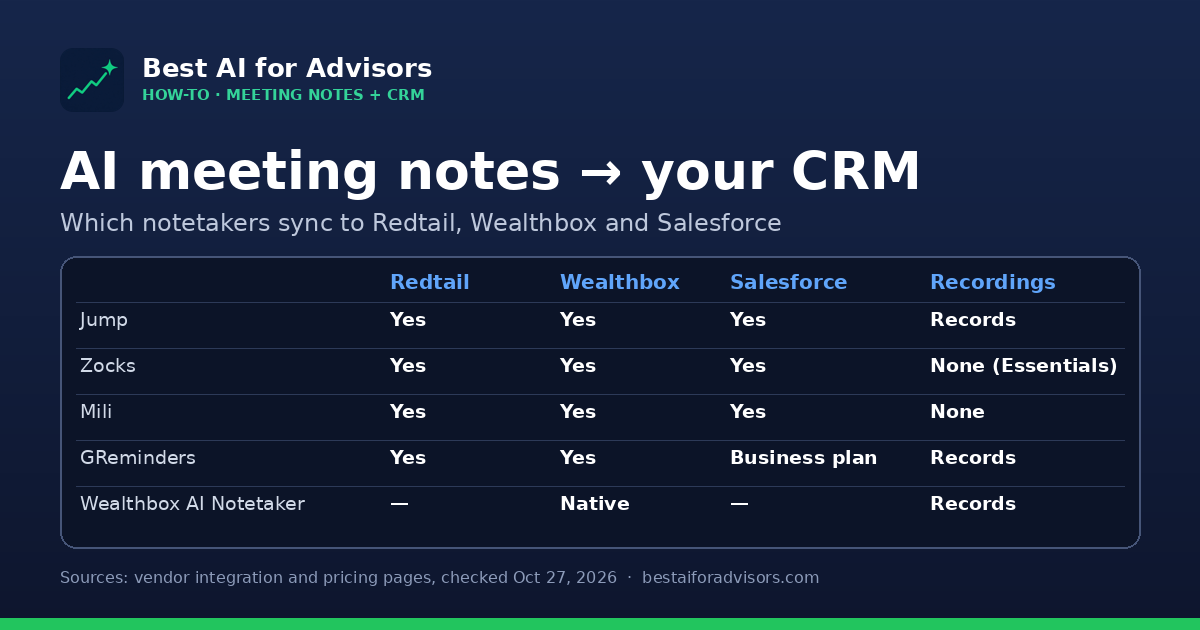
Short answer: Every advisor notetaker says it "integrates with your CRM," but that can mean anything from pasting a summary into a note to updating custom fields, creating assigned tasks and triggering workflows. Before you buy, decide which of those four handoff levels you need, check which plan unlocks your CRM, and run five real meetings through the sync with your operations person watching. Jump, Zocks, Mili and GReminders all write to Redtail and Wealthbox; Wealthbox's own AI Notetaker skips the integration entirely if you already use that CRM.
Key takeaways
- AI notetakers were in 42.86% of advisory practices in the 2026 T3/Inside Information Software Survey, so the buying question has moved from "should we" to "what lands in the CRM."
- There are four levels of CRM handoff: note text, assigned tasks, field updates and workflow triggers. Vendors differ most on the last two.
- Plan tiers matter: GReminders puts Salesforce, Microsoft Dynamics and Advyzon on its Business plan (from $132/month), not Essentials (from $69/month).
- Recording policy is part of the handoff. Mili and Zocks Essentials say they keep no recordings; Jump, GReminders and the Wealthbox AI Notetaker record.
Why the CRM handoff matters more than the transcript
The 2026 T3/Inside Information Software Survey (2,906 responses) found AI notetakers in 42.86% of advisory practices the first year it tracked the category. Most of those tools write a decent summary. Where they differ is what happens next: whether the note lands on the right household, whether the follow-up becomes a task with an owner and a due date, and whether the client's new address or retirement date updates the CRM field your reports run on.
For a small RIA, that handoff is the whole return on the tool. A summary sitting in a separate app is one more place to look. A summary that files itself, assigns the paperwork to your operations associate and updates the planning software is the time savings you were promised. This checklist is about testing that part before you sign.
The four levels of "integrates with your CRM"
- Note sync. The summary is saved as a note or activity on the contact. Every advisor notetaker here does this.
- Task creation. Action items become CRM tasks with an assignee and due date. Jump says it syncs AI-generated tasks "with assignee, due date, and more" for CRMs such as Advyzon, XLR8 and SmartOffice; GReminders lists task sync on Essentials.
- Field updates. The tool proposes changes to structured fields (contact details, goals, custom fields). Jump lists "update fields after conversations" for Salesforce, Wealthbox and Redtail; Mili says it updates "notes, tasks, and custom fields — not just basic summaries"; Zocks says it syncs 200+ fields from conversations into RightCapital.
- Workflow triggers. The meeting starts a CRM workflow or opportunity. Mili says it can trigger CRM workflows from meeting content; GReminders says it can create opportunities and launch workflows; Jump can send approved follow-ups to Hubly to start a workflow.
Ask each vendor to show levels 3 and 4 live in your CRM, not in a slide. "Integrates with Redtail" on a logo wall usually means level 1.
Which notetakers write to Redtail, Wealthbox and Salesforce
| Tool | Redtail | Wealthbox | Salesforce | Recordings | Starting price |
|---|---|---|---|---|---|
| Jump | Yes (embedded in Redtail) | Yes | Yes, incl. Financial Services Cloud | Records; bot joins the call | $100/advisor/mo (Meet) |
| Zocks | Yes | Yes | Yes, two-way sync | None on Essentials | $67/user/mo billed annually |
| Mili | Yes | Yes | Yes | None; no bot joins | From $60/mo |
| GReminders | Yes (Essentials) | Yes (Essentials) | Business plan only | Records, kept per your settings | From $69/mo; Business from $132/mo |
| Wealthbox AI Notetaker | No | Native | No | Records and transcribes | $49/user/mo add-on (introductory) plus CRM |
Two notes on the table. Jump and Zocks both offer a Zapier connection for CRMs they don't support natively, which is fine for level 1 but rarely for field updates. And the Wealthbox AI Notetaker only makes sense if Wealthbox is your CRM; it saves notes straight to the contact record with no integration to maintain. Full plan lists are on meeting notes pricing.
What a small team pays
List prices for a two-advisor practice with one operations associate, as published October 27, 2026. Seats for staff vary by vendor, so confirm what your associate needs.
| Setup | Monthly |
|---|---|
| Jump Meet, 2 advisors (2 × $100) | $200 |
| Zocks Essentials, 2 advisors billed annually (2 × $67) + admin assistant seat ($25) | $159 |
| Mili, 2 seats at the published starting price (2 × $60) | from $120 |
| GReminders Essentials (starting price; plans are customized) | from $69 |
| Wealthbox AI Notetaker for 2 advisors (2 × $49), on top of Wealthbox Pro (3 × $75) | $323 incl. CRM |
Mili and GReminders publish starting prices rather than per-seat plan prices, so get a written quote for your exact seat count. Compare head to head on Mili vs GReminders, Mili vs Zocks, GReminders vs Jump and Jump vs Zocks.
The 10-step handoff checklist
- Write down your CRM targets first. List the note type, task categories and the five to ten fields you want updated after a review meeting. Without this, every demo looks good.
- Confirm the plan that unlocks your CRM. GReminders puts Salesforce, Microsoft Dynamics, SmartOffice and Advyzon on Business; check every vendor's tier table the same way.
- Check household matching. Ask how the tool picks the right contact or household when a spouse joins or a meeting invite comes from a personal email.
- Decide who approves before sync. Pick whether notes and field changes post automatically or wait for advisor review. Jump says nothing reaches a client or system of record until an advisor approves.
- Set task rules. Map action items to owners (advisor vs. associate) and default due dates, then test that tasks arrive assigned, not as text inside the note.
- Test custom fields. Have the vendor map at least one custom field live in your CRM during the trial.
- Settle recordings and consent. Choose between recording and no-recording tools with compliance, and write the client disclosure before the first live meeting.
- Wire up archiving. Confirm transcripts or notes reach your archive (GReminders lists Smarsh, Veritas and Global Relay; Zocks lists Archive Intel; Mili lists Global Relay).
- Set retention. Decide how long transcripts live in the notetaker versus the CRM, and whether the vendor offers custom retention on your plan.
- Run five real meetings and time the cleanup. Have your operations associate log how many minutes each meeting's CRM record took to fix. That number, not the demo, is your ROI.
For the recordkeeping side, see AI chat and notetaker recordkeeping under SEC and FINRA rules. To turn the timing data into a business case, use the AI ROI calculator.
Get one practical AI-for-advisors email a week
Weekly: the newest AI tools for advisors, in 3 minutes.
New AI tools for advisors, what changed, and practical ways to use them. One email a week; unsubscribe anytime.
Confirms on our beehiiv page. Free, no spam, unsubscribe anytime. What you'll get
Recording vs. no recording
This choice shapes your compliance workload more than any integration. No-recording tools (Mili, and Zocks on Essentials) keep transcripts and notes but no audio, which some firms and clients prefer. Mili also says no bot joins the call. Recording tools (Jump, GReminders, the Wealthbox AI Notetaker) keep a fuller record you can replay, which is useful when a client disputes what was said but means more data to retain, supervise and protect.
Wealthbox added compliance controls to its notetaker on October 20, 2026, including a Meetings Compliance Monitor role, keyword detection in transcripts and automatic transcript deletion after a set number of days. Ask every vendor for the equivalent: who can see transcripts, what gets flagged and when data is deleted.
Which setup fits your firm
- On Wealthbox and want the simplest path: try the native Wealthbox AI Notetaker first. See Wealthbox vs Redtail.
- On Redtail and want deep field updates: demo Jump (embedded in Redtail) and Zocks.
- Compliance wants no recordings: shortlist Mili and Zocks.
- You also need client scheduling and text reminders: GReminders covers both in one subscription.
- On Salesforce: Jump, Zocks and Mili include it; GReminders needs Business.
Still building a shortlist? Start with the best AI notetakers for financial advisors, the best AI meeting notes tools and our best CRM for financial advisors guide.
Get one practical AI-for-advisors email a week
Weekly: the newest AI tools for advisors, in 3 minutes.
New AI tools for advisors, what changed, and practical ways to use them. One email a week; unsubscribe anytime.
Confirms on our beehiiv page. Free, no spam, unsubscribe anytime. What you'll get
Tools mentioned
| Tool | Best for | Starting price | Free option | Link |
|---|---|---|---|---|
| Jump AI assistant for financial advisors that turns meetings, emails and documents into notes and workflows. | Advisors who want meeting notes plus follow-up workflows | From $100/advisor/mo | Free trial offered on the Meet plan. | Visit ↗ |
| Zocks AI assistant for financial advisors covering meeting prep, notes, onboarding and planning data. | Firms that want deep CRM integrations | From $67/user/mo (annual) | None listed | Visit ↗ |
| Mili AI agents for wealth firms, led by a meeting agent that takes notes without recordings or a bot in the call. | Firms that want no-recording meeting notes plus agents for onboarding, prospect research and planning | From $60/mo | 14-day free trial. | Visit ↗ |
| GReminders Meeting management platform for financial professionals that combines scheduling, SMS/email reminders, CRM automation and an AI notetaker. | Advisors who want scheduling, reminders and AI meeting notes in one tool | From $69/mo | Free trial offered. | Visit ↗ |
| Wealthbox CRM workspace built for financial advisors, with AI features. | Advisors who want a modern, easy-to-use CRM | From $59/user/mo | Free trial offered. | Visit ↗ |
| Redtail CRM Long-standing advisor CRM, now part of Orion, with compliant texting, imaging and email archiving. | Advisors who want a widely used, advisor-specific CRM | From $39/user/mo (annual) | Free trial offered. | Visit ↗ |
Checked against vendor websites on October 21, 2026. List prices as of October 21, 2026; prices change often, so confirm on each vendor's site.
FAQ
Which AI notetakers integrate with Redtail?
Jump (embedded inside Redtail), Zocks, Mili and GReminders (on its Essentials plan) all list Redtail integrations on their own sites as of October 27, 2026.
Do AI notetakers update CRM fields or just add a note?
It depends on the tool and CRM. Jump lists field updates for Salesforce, Wealthbox and Redtail, Mili says it updates custom fields and triggers workflows, and GReminders says it maps custom fields. Ask to see a field update live in your CRM during the trial.
Does Wealthbox have its own AI notetaker?
Yes. The Wealthbox AI Notetaker is built into the CRM's Meetings feature as an add-on, listed at an introductory $49 per user per month on top of a Wealthbox plan.
Which AI notetakers don't record meetings?
Mili says it creates no audio or video recordings and no bot joins the call. Zocks offers notes without recordings on its Essentials plan. Jump, GReminders and the Wealthbox AI Notetaker record meetings.
How do I test an AI notetaker's CRM integration?
Write down the note type, tasks and fields you want updated, run five real meetings during the trial, and have your operations person time how long each CRM record takes to fix afterward.
Sources
Vendor details and prices were checked on the vendors' own websites on October 27, 2026. Prices and features change often; confirm with each vendor.
- 2026 T3/Inside Information Software Survey (PDF)
- Jump integrations
- Jump pricing
- Jump security (advisor approval before sync)
- Zocks integrations
- Zocks pricing
- Mili vs Jump comparison page (Mili pricing, integrations, no-recording claims)
- GReminders pricing and FAQ
- Wealthbox pricing
- Wealthbox AI Notetaker
- Wealthbox: AI Notetaker adds compliance monitoring, keyword detection and retention controls (Oct. 20, 2026)
Related reading
Get one practical AI-for-advisors email a week
Weekly: the newest AI tools for advisors, in 3 minutes.
New AI tools for advisors, what changed, and practical ways to use them. One email a week; unsubscribe anytime.
Confirms on our beehiiv page. Free, no spam, unsubscribe anytime. What you'll get
More from the blog
Meeting notes
Best AI Notetakers for Financial Advisors (2026)
The best AI notetakers for financial advisors in 2026: Jump, Zocks, Zeplyn, Finmate AI, Fathom and Otter compared on adoption, pricing, privacy and CRM fit.
October 21, 2026 · 7 min read
Comparisons
Jump vs Zocks: Which AI Assistant Should Advisors Choose? (2026)
Jump vs Zocks for financial advisors: 2026 market share and ratings, pricing, recording vs. no recording, integrations, security, and who should choose each.
October 21, 2026 · 5 min read